

Terminal Server & Remote Desktop Services (RDS) Installation
Terminal Server installation and Remote Desktop Services (RDS) from CORECASYS let you remotely access accounting software, use ERP from outside, and work with Express from home via a central Remote Desktop Server — no duplicate installs at every branch.
We deploy Windows Terminal Server and Microsoft Terminal Server as a complete Remote Desktop Solution for branches, remote workers, and Thin Client devices — data stays on your corporate server with controlled access.
CORECASYS provides Terminal Server installation and Remote Desktop Services (RDS) for organizations that need to share applications across branches, remotely access accounting software, use ERP from outside, and work with Express from home. Users connect via Remote Desktop (RDP) to a central Remote Desktop Server with unlimited concurrent users. Print with TS Print. Supports Thin Client — low bandwidth, ideal for branches on VPN or slow internet lines.
Remote Desktop Solution Use Cases
Remote Desktop Services for Business
- Remote accounting software — finance teams connect to accounting apps on the central server without copying data to client PCs
- Use ERP from outside — branches and remote staff run the same ERP on one Terminal Server
- Work with Express from home — install Express on Windows Server and remote from home via RDP
- Thin Client — lightweight devices connect directly to Remote Desktop Server — lower cost, easier management
- Microsoft Terminal Server / RDS / VDI — standard enterprise Remote Desktop Solution on Windows Server
Unlimited concurrent RDP
Support unlimited simultaneous Remote Desktop connections. Each user gets their own desktop, working independently under admin-defined permissions.
Print to client printers
Print from the server to each user's local printer seamlessly with TS Print — designed specifically for Terminal Server environments.
Centralized backup
Data and applications live on the central server — easier backup than scattered client machines, less risk of data loss.
Better security
Control access rights, prevent unauthorized data copying, manage everything from one point — resolve user issues quickly.
What is Terminal Server and Remote Desktop Services (RDS/VDI)?
Terminal Server or a Remote Desktop Server or a Virtual Desktop Infrastructure lets multiple users connect via Remote Desktop (RDP) to a central Windows Terminal Server simultaneously — each gets their own desktop while running shared server applications securely. Remote Desktop Services (RDS) is Microsoft's Windows Server role for enterprise Microsoft Terminal Server deployments.
When branches connect via LAN-to-LAN VPN, clients or Thin Client devices use RDP (Remote Desktop Protocol) instead of pulling data directly — very low bandwidth. A 1 Mbps/512 Kbps ADSL line can support 30–40 clients. When Terminal Server sits on the same network as the application server, inter-branch bandwidth usage drops dramatically.

Benefits of Terminal Server and RDS/VDI
- Share licensed software effectively — accounting, ERP — remotely access accounting software from branches and home
- Secure shared applications — users can only do what you allow
- Share applications across branches using only 15–20 Kbps per connection
- Faster support — centralized management from one point
- Save on software license costs
- Easier internal data security management
- Prevent unauthorized data exfiltration
Printing with TS Print
Print from server to user's local printer
A classic Terminal Server challenge is printing — CORECASYS installs TS Print so users can print from server applications to printers connected to their own PC smoothly, without moving files or complex setup.
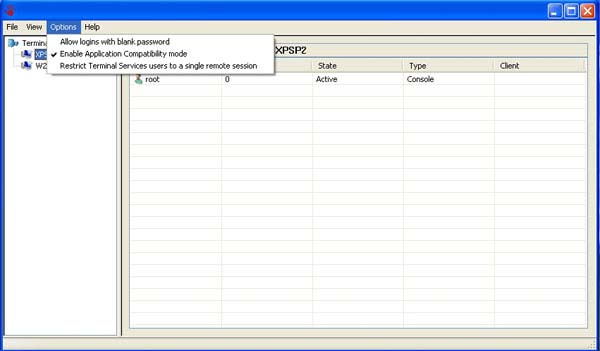
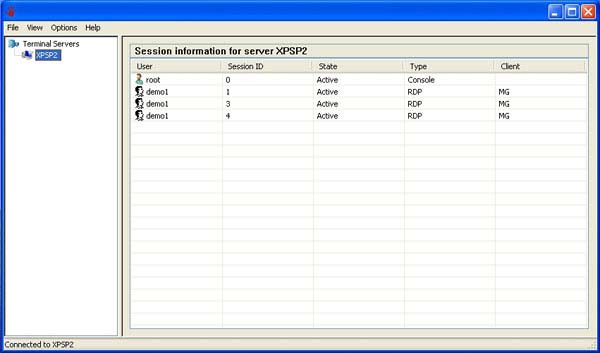
Sample screens
Terminal Server video guides
Terminal Server vs VPN
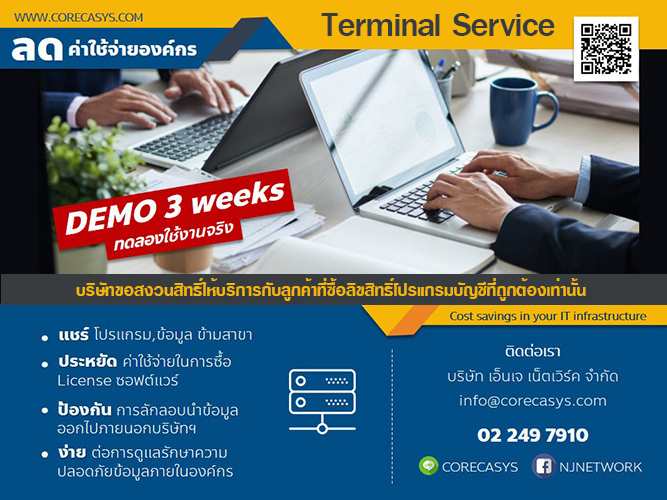
CORECASYS sells and installs systems differently from off-the-shelf products — we include after-sales service and practical know-how. As a system integrator (SI), we support you until your needs are met. Our policy of a 3-week trial confirms that the installed system works reliably without creating new problems.
FAQ — Terminal Server
- What is Terminal Server?
- A Remote Desktop Server that lets multiple users connect via RDP simultaneously. Each gets their own desktop while running shared server applications securely.
- What is Remote Desktop Services (RDS/VDI)?
- Microsoft's Windows Server role for multi-user remote access to central server applications — CORECASYS installs RDS and Windows Terminal Server for businesses.
- How do you remotely access accounting software and use ERP from outside?
- Install Terminal Server at headquarters with accounting or ERP software. Branches and home workers connect via RDP — only 15–20 Kbps per connection.
- Can employees work with Express from home?
- Yes — install Express on Terminal Server and remote from home via Remote Desktop Solution. No need to install on every PC.
- How does Thin Client work with Terminal Server?
- Thin Client devices connect via Remote Desktop to Terminal Server directly — no local software install, lower cost, easier management.
- How is Terminal Server different from VPN?
- Terminal Server sends only screen updates — very low bandwidth. VPN pulls data directly and uses more bandwidth. See comparison videos above.
- How long is the trial period?
- Demo system available for remote trial up to 3 weeks. Call 086-7041555
Datasheet Download Click here
Interested in Terminal Server and Remote Desktop Services (RDS) installation or a remote demo?
Call 086-7041555 or see branch VPN service | ภาษาไทย