

One of the biggest IT challenges for large organizations is managing vast amounts of data, operating systems and applications across offices in different locations. IT teams need solutions that reduce costs, improve performance and provide fast, convenient and secure management. This is driving increased adoption of VDI (Virtual Desktop Infrastructure).
User-Centric Computing
Centralize data in VMware Infrastructure and access it from anywhere — smartphones, tablets and MIDs.
View 5 + PCoIP
Deliver VDI over LAN and WAN with PCoIP, reducing data volume and bandwidth for fast branch access.
Enhanced security
Centralized data reduces distribution and duplication while protecting against data loss during critical events.
Lower IT costs
Reduce operating time and costs with stable scalability as the organization grows.
VMware — user-centric VDI
VMware simplifies data management through user-centric computing. It reduces data distribution and duplication by centralizing information in VMware Infrastructure. Users can securely access their work from anywhere on smartphones, tablets or MIDs (Mobile Internet Devices). VMware View 5 also delivers the complete VDI environment over LAN and WAN. Its PCoIP technology reduces data volume, accelerates delivery to branch offices and lowers bandwidth usage.
VMware VDI illustrations
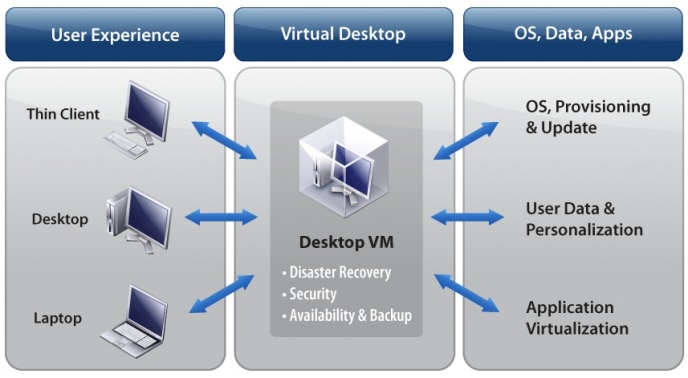
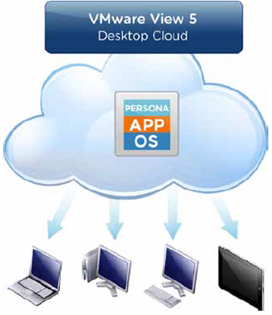
Key VMware View 5 capabilities
- 1. Smooth, uninterrupted operation — VMware View 5 includes PCoIP technology for working anywhere, at any time and on any device. PCoIP is optimized to deliver VDI over both LAN and WAN. If a session is disconnected, it reconnects automatically so users can continue working without losing data.
- 2. Greater memory efficiency — VMware View 5 uses only 1% memory compared with the previous 6%, improving server consolidation. Balloon memory configuration further optimizes memory utilization and cost efficiency.
- 3. Advanced 3D support — VMware View 5 provides complete 3D support without requiring a dedicated graphics card or additional peripherals.
- 4. Reduced bandwidth usage — Image Side Caching in VMware View 5 can reduce bandwidth usage by up to 30% for screen and operating-system updates. PDF access over LAN and WAN works as follows:
- On a LAN, documents open and scroll smoothly without stuttering.
- Over a WAN, document data is cached in the endpoint PC memory. This avoids repeatedly retrieving the same document and makes PDF viewing smoother and faster for the user.
What comes with VMware View 5
VDI infrastructure
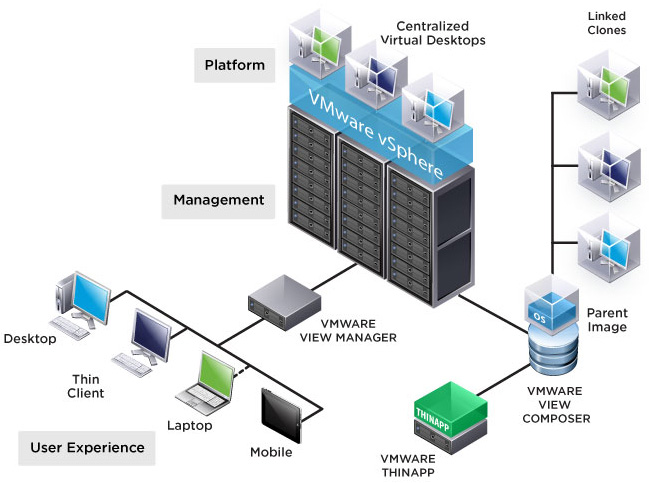
VMware includes VMware vSphere Desktop Edition, designed specifically for VDI. vSphere keeps the environment continuously available, scalable and stable as the organization grows. Its protection features also simplify workload transfer to another host and help prevent data loss during critical events.
A centralized management solution that provides complete control over virtual desktops, storage, networking and other essential VDI resources.
Desktop and image management
VMware View Manager helps IT teams create, administer and assign access rights to VDI desktops.
VMware View Persona Management centralizes user files and settings, reducing duplication across multiple PCs. Wherever users sign in, they receive the same environment, desktop and files.
VMware Composer creates a single master image even for an organization with 100 PCs. This saves administration time and storage capacity for other workloads.
Client, application and security
Application virtualization lets users create application packages for delivery with VDI or share centralized packages with other users.
VMware View Client provides easy VDI access from Windows PCs, Macs, thin clients, zero clients, iPads and Android-based clients. Local Mode through Windows also keeps the VDI environment available wherever users work.
VMware vShield Endpoint is an API designed to integrate with third-party antivirus software. It enables virus scanning at the hypervisor layer, reducing the resource load of virus and malware checks while improving VDI protection.
VMware videos
System backup and data protection
A highly available system
CPU load balancing
VMware enables organizations to manage data more efficiently, reduce operating time and costs, and maintain strong protection for business information.
Interested in VMware VDI / Virtual Desktop Infrastructure?
Call 086-7041555 or see Cloud VM · Terminal Server